As a freelancer, handling multiple projects at once can feel overwhelming. You juggle client deadlines, track tasks, and manage time without a team to back you up. This is where AI project management tools come in. These tools use smart technology to automate routine work, predict issues, and help you stay organized. In this guide, we cover everything you need to know about AI project management tools for freelancers. We look at their benefits, top options in 2025, how to pick one, and tips for success. By the end, you’ll have practical steps to make your work easier and more efficient.
Freelancers often work alone, so tools that save time and reduce errors are key. AI can handle things like task suggestions or risk alerts, letting you focus on creative parts of your job. This post draws from recent reviews and user experiences to give you real insights. Whether you’re new to these tools or looking to switch, you’ll find value here. We aim to answer common questions, like what features matter most and how to avoid common pitfalls.
What Are AI Project Management Tools?
AI project management tools are software platforms that combine traditional task tracking with artificial intelligence. They go beyond simple to-do lists by using machine learning to analyze data and offer smart help. For freelancers, this means getting suggestions on task order, automatic updates, or even generating reports. These tools often include boards, calendars, and reminders, but the AI part makes them stand out.
Think of a basic tool like a notebook for tasks. Now add AI, and it becomes a smart assistant that learns from your habits. It might notice you often miss deadlines on certain project types and suggest adjustments. Common features include automation for repetitive tasks, like sending client updates, and predictive analytics to spot delays early. For solo workers, this reduces the mental load of remembering everything.
Many tools integrate with other apps, such as email or calendars, to pull in data automatically. This creates a central hub for all your work. Unlike non-AI tools, these can process large amounts of information quickly, providing insights you might miss. However, they still need your input to work best, as AI isn’t perfect yet.
Benefits of AI Project Management Tools for Freelancers
Freelancers face unique challenges, like irregular workloads and no support staff. AI tools address these by automating admin work, freeing up time for billable hours. For example, they can sort emails into tasks or track time spent on projects without manual entry. This leads to better accuracy in billing and less forgotten details. Overall, productivity can increase by up to 30%, according to studies on AI in management.
Another big plus is risk management. AI scans your project data to flag potential issues, like overlapping deadlines. As a freelancer, this helps you avoid overcommitting and burning out. Tools can predict completion times based on past performance, making your estimates more reliable for clients. This builds trust and can lead to repeat business.
Collaboration improves too, even if you’re solo. Many tools have client portals where you share progress without endless emails. AI can summarize updates, keeping communication clear and short. Plus, data insights help you spot patterns, like which project types take longer, so you can price them better. In short, these tools make running a freelance business smoother and more professional.
Time Savings and Automation
One key benefit is how AI handles repetitive tasks. For instance, it can auto-assign priorities or remind you of due dates. Freelancers often spend hours on admin, but AI cuts that down. Tools like these let you set rules, such as moving completed tasks to archives automatically. This means more time for actual work, not organization.
Automation extends to invoicing and reporting. AI can pull time logs and generate bills, reducing errors. If you track hours manually, you might underbill, but AI ensures accuracy. Over time, it learns your patterns and suggests efficiencies, like batching similar tasks. Freelancers report saving several hours a week this way, boosting income potential.
Improved Decision Making
AI provides data-driven advice, helping you make smarter choices. It analyzes past projects to suggest timelines or resources needed. As a freelancer, this prevents underestimating jobs and missing deadlines. Tools offer dashboards with real-time metrics, showing where you’re on track or falling behind.
For client proposals, AI can estimate costs based on similar work. This makes your bids competitive yet profitable. It also highlights risks, like if a project might exceed budget. With these insights, you decide faster and with more confidence, leading to better outcomes.
Enhanced Client Relationships
AI tools help maintain clear communication with clients. They can generate status reports or answer simple queries via chat features. This keeps clients informed without you constantly checking in. For freelancers, strong relationships mean more referrals.
Some tools track client feedback patterns, suggesting ways to improve service. If a client often asks for revisions, AI might flag areas to double-check upfront. This proactive approach builds loyalty and reduces conflicts.
Top AI Project Management Tools for Freelancers in 2025
In 2025, several AI tools stand out for freelancers. We selected these based on features, ease of use, and affordability for solo users. Each offers free or low-cost plans, with AI that aids task management. We focus on how they fit freelance needs, like flexibility and integrations.
Asana
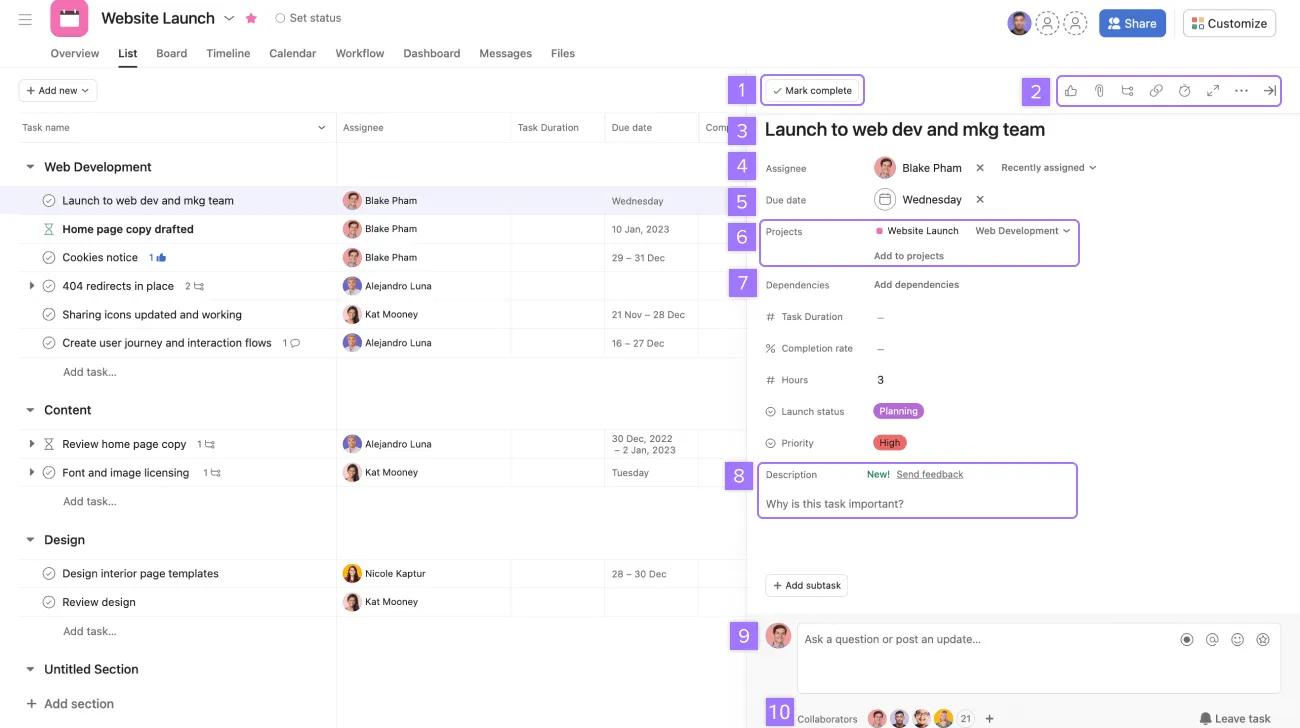
Asana uses AI to sort tasks by relevance and suggest next steps. For freelancers, this means quick setup of project boards without much planning. Key features include smart status updates that detect roadblocks and generate reports. It integrates with email and calendars, pulling in deadlines automatically.
Pros include many views like lists or timelines, making it versatile for different work types. Cons are the learning curve and AI locked behind paid plans starting at $13.49/month. Freelancers benefit from productivity boosts, as AI recommends task order based on your habits. It’s great for managing multiple clients.
Asana’s AI also handles text generation for summaries, saving time on client updates. You can set goals, and it uses data to make them realistic. For solo users, the free plan offers basics, but upgrading unlocks full AI power. Overall, it’s reliable for organized freelancers.
ClickUp

ClickUp lets you ask questions about projects, like “What’s stuck?” AI answers with summaries or finds duplicates. Freelancers love this for quick insights without digging through lists. Features include space summaries and progress reports, all customizable.
Pros are the robust features at $10/month plus $5 for AI. Cons include occasional bugs. It suits freelancers by automating reports for clients and tracking progress alone. Integrations with thousands of apps via Zapier make it flexible.
ClickUp’s AI writer helps craft clear emails or notes, useful for communication. You can detect stuck tasks early, preventing delays. For solo work, it’s powerful yet scalable, starting free with upgrades for more.
Wrike
Wrike’s AI predicts risks by analyzing workloads and past data. Freelancers get alerts on potential delays, helping adjust plans. Features include text summarization and custom interfaces.
Pros are strong automation; cons are segmented pricing from $10/month. It benefits solo users by focusing on individual risks, not team ones. Integrations enhance workflows.
Wrike Intelligence gives color-coded status, making oversight easy. For freelancers, this means better time management and fewer surprises.
Notion
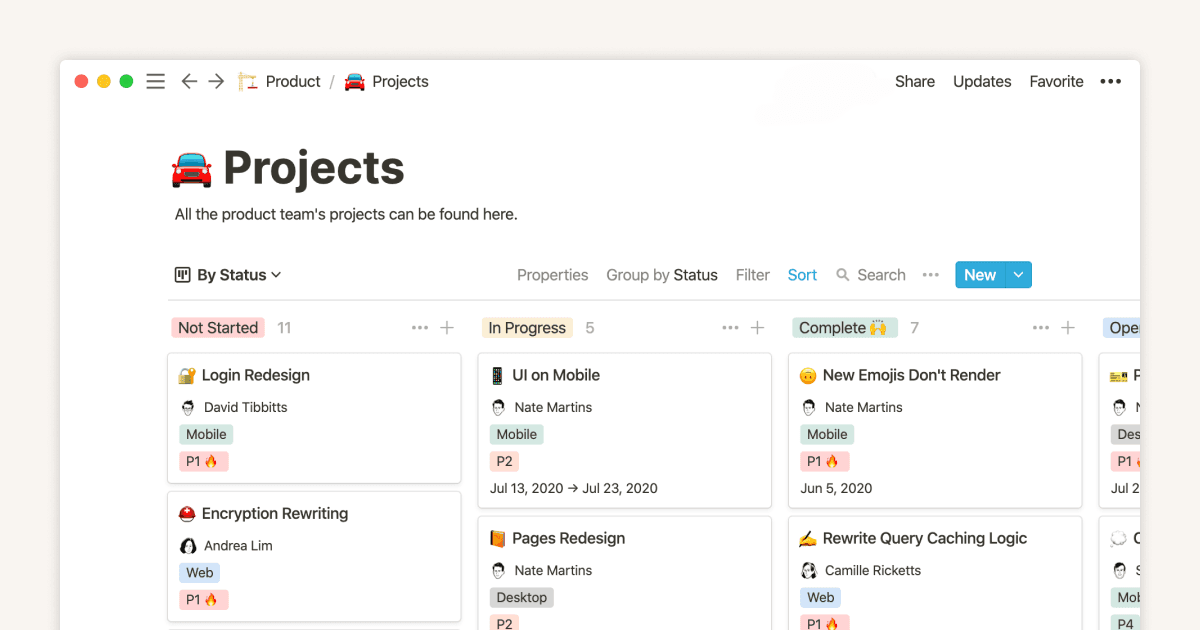
Notion combines notes and tasks with AI for summaries and action items. Freelancers use it as an all-in-one hub. Features include customizable views and templates.
Pros are flexibility; cons are offline limits. Free plan includes AI trial, paid at $10/month. It helps by extracting tasks from notes, ideal for creative freelancers.
Notion AI edits text or translates, aiding global clients. For solo use, it’s simple yet powerful.
Hive
Hive’s Buzz creates projects from prompts, breaking them into tasks. AI assists with content and edits. Freelancers set up gigs fast.
Pros are customizable dashboards; cons are mobile app quality. Some AI free, full at $7/month. It streamlines solo planning.
HiveMind handles queries, saving research time. Integrations connect to other tools.
Taskade
Taskade generates workflows with AI agents. Features include checklists and mind maps, all free with unlimited sharing.
Pros are templates; cons are complexity for some. Ideal for remote freelancers.
AI chat assists brainstorming, turning ideas into tasks.
WorkifAI
WorkifAI focuses on freelancers, generating proposals and estimates. AI improves with use.
Pros are client management; pricing not specified but affordable. It handles from calls to emails.
For solo users, it’s a toolkit for end-to-end management.
How to Choose the Right AI Project Management Tool as a Freelancer
- Start by assessing your needs. List must-have features, like time tracking or client sharing. Consider your budget—many offer free tiers, but check AI access.
- Test integrations with your current apps, such as email or invoicing. Ease of use matters; pick intuitive interfaces to avoid steep learning.
- Read reviews for freelancer experiences. Try free trials to see fit. Factor in scalability if you grow.
- Consider data privacy, especially with client info. Choose tools with strong security.
- Weigh pros against cons, like cost vs. features. Aim for balance in your workflow.
Best Practices for Using AI Project Management Tools as a Freelancer
- Start small by integrating one feature, like automation, into your routine. This builds familiarity without overwhelm.
- Always review AI outputs—check suggestions for accuracy, as it can err.
- Combine AI with your judgment; use insights but decide based on context.
- Set clear rules for tasks to train the AI better over time.
- Use integrations to connect tools, creating seamless flows.
- Track usage to see time savings and adjust as needed.
- Keep data updated for reliable predictions.
Potential Challenges and How to Overcome Them
- Cost can be a hurdle; start with free plans and upgrade only if needed.
- Learning curves exist; use tutorials or start with basics.
- Data privacy risks—choose tools with encryption and review policies.
- Over-reliance on AI—balance with manual checks.
- Biases in AI from training data—verify outputs for fairness.
- Ethical issues, like data use—be transparent with clients.
- To overcome, research tools thoroughly and test gradually.
Future Trends in AI for Project Management
By 2030, AI may handle 80% of routine tasks, according to recent reports, with emerging trends focusing on predictive planning to deliver more accurate forecasts for project outcomes. This evolution will also bring real-time monitoring capabilities that allow projects to adapt dynamically as conditions change. Hybrid approaches will increasingly blend agile methodologies with AI to enhance overall flexibility in workflows. As AI takes over more technical aspects, soft skills such as communication and problem-solving will gain even greater importance for human involvement.
Expect further advancements in automation for data handling, alongside a stronger emphasis on ethical AI practices to ensure responsible use. For freelancers in particular, these developments promise tools that are increasingly tailored to solo operations, making independent work more efficient and intuitive.
Final Thoughts on AI Project Management Tools for Freelancers
AI project management tools for freelancers offer real help in staying organized and efficient. From Asana’s suggestions to ClickUp’s queries, options fit various styles. Choose based on your needs, follow best practices, and watch for trends. With these, you can handle more work with less stress, growing your business. Try one today and see the difference.